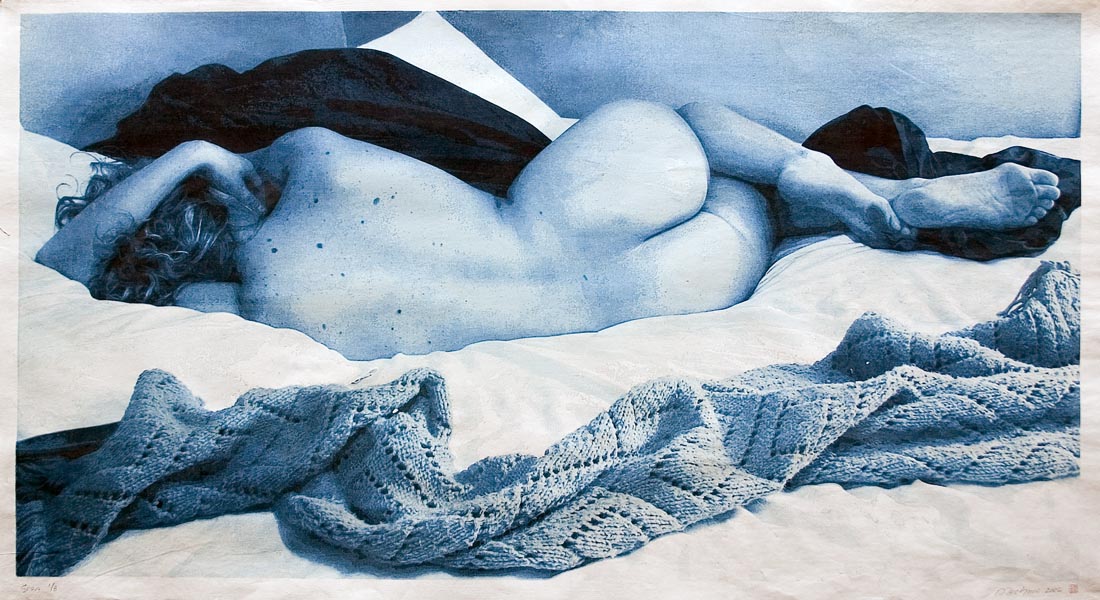
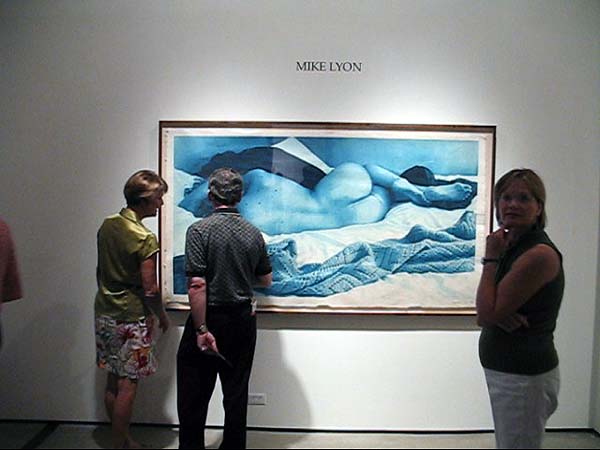
“Sara” 42×77 inch woodcut from 17 blocks

August 2, 2006 by Mike Lyon  
Filed under Video, Woodblock

13 Comments
1,284 views

The large (42 x 77 inch) prints of “Sara” reclining on her messy bed have been successfully completed — I selected 8 for the edition plus two proofs. There is some variation among the edition, the greatest differences being in the depth of the deepest tones behind the head and in the top background — these were introduced when I used the baren to print one of the blocks, pressing too hard about half the prints resulting in some loss of color at the edges of the block forms. Something to remember for next time! But overall the ten printed sheets are reasonable uniform, all things considered.


video documents start-to-finish printing of one sheet around block four…

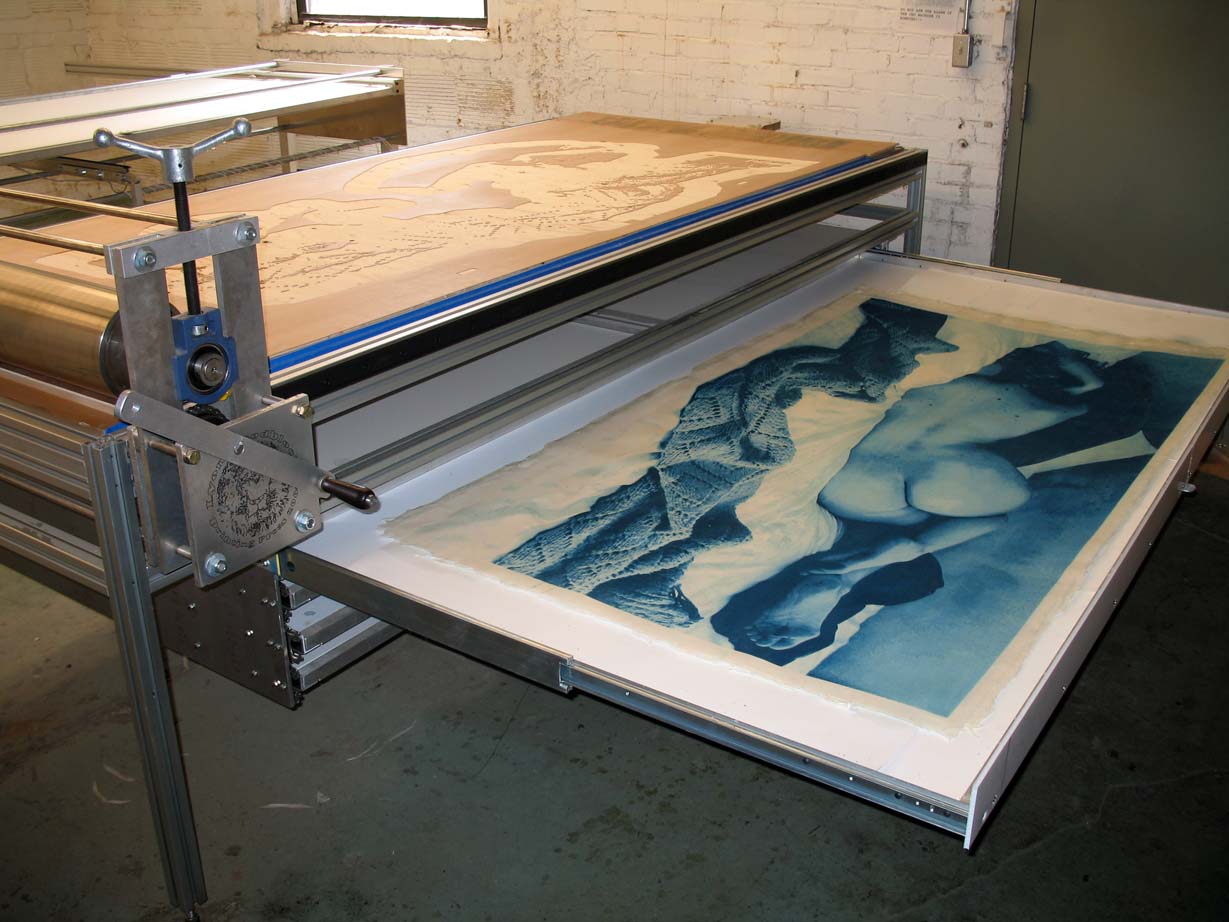
Good lord, it’s hot in my studio! I’m working on “Sara”, a 17 block woodcut on ten sheets of 42 x 77 inch Iwano Ichibei hosho paper. Sweaty work and EXHAUSTING!!! I’m managing to print about 3 or 4 blocks per day and that’s really all I am able to manage! But I’m getting better and better at using the large press I built about seven or eight months ago, even though this is only the third edition I’ve pulled on it.

I handled registration a bit differently this time… The blocks were carved with three identical side kento, each about 1 1/2 inches long, and the center of the middle one was inscribed with a very narrow line. I used a razor blade to produce three flat edges in the deckle of each sheet (parallel to the edge of the sheet)so that they’d line up with the kento in the blocks, and I drew a short pencil line in the center of the middle ‘notch’ to be lined up with the line inscribed in the middle kento. Surprisingly, this worked very well, and I found it easy to register each sheet to the blocks, aligning the pencil mark with the inscribed line on the block. At the far edges, this resulted in about +/- .05 inch of dead on which is plenty close for the image and the eye. Given the size of the sheets I’m not sure I can do much better than that…

-- Mike

Comments

13 Responses to ““Sara” 42×77 inch woodcut from 17 blocks”
  1. Dave Bull says:

    In the top photo of this post, the one with the block yet to be touched with pigment, we can see that there is a large ‘island’ area left uncarved around the outer part of the block.

    I guess you’ve sanded down the edge of this, but doesn’t that edge still leave marks on the print?

  2. Barbara Mason says:

    My gosh, that video was amazing. Good Job, what an ordeal to get a print. Glad your machines are all working as they are supposed to! Hard to keep such a large block damp in all the printing areas.
    Barbara

  3. Mike Lyon says:

    Dear Dave (and Barbara),

    The blocks contain ‘islands’ for paper support around the outside and also in the center (hard to see the center island in the photo). I do sand them so that the edges are very smoothly beveled and there is no ‘edge’ to leave any mark. Far as I can see, there is not going to be any impression from these islands in the finished prints, but the wrinkles caused by the paper buckling under the roller are the sort of problem which would make YOU crazy! To me, they add an interesting kind of texture and don’t detract from the object. BUT I’d rather those accidents of process didn’t occur — so I’ll try to design the next block set to prevent wrinkling (may have to eliminate the perimeter paper supports to do that, but must keep the center supports or I’ll have registration problems out the wazoo).

    Barbara Mason asked about keeping the large blocks dampened — that’s not a problem at all — the trick is to keep the blocks from becoming TOO damp (in order to avoid squeeze out at the edges) — the blocks print very well even when the surface appears to be way too dry!

    A related problem which DOES bother me is blotching! It is VERY difficult and time consuming to keeep the paper evenly dampened! When the paper is not evenly damp, I get some buckling in the drier areas which makes the paper WANT to dip down into the inky carved-away perimeter around certain of the printing areas and I’ve been getting some blotching as a result. Sometimes I can easily wipe those blotches (and any squeeze out) clean with the edge of my palm immediately after printing, and sometimes not. So far these blotches don’t detract TOO much from the image as a whole, but I’d SURE rather they not be there at all!

    The sheets are so large and the humi-drawer so small and handling so difficult) that it is next to impossible to ‘crawl’ or otherwise arrange the papers so that just printed / damper areas are adjacent to less-damp areas (although I can accomplish this to some degree by shifting the prints laterally in the take-up drawer it’s insufficient). So every two or three blocks (so far only AFTER it has already become a noticable problem, but I’m becoming more and more sensitive to this, and so catching it earlier and earlier), I have been using a 2nd large mizu-bake to redampen the areas no-longer being printed. Obviously, this slows down printing to a great degree, and just as obviously I need to do it more frequently.

    I brush the water onto the (gasp!)inky side of the sheet and this seems to work well enough — the pigment, even immediately after printing, seems to have no desire to run or bleed into the just-dampened areas, nor to accumulate in the brush, but it still makes me nervous as hell to do it!

    – Mike

  4. tom says:

    Fantastic print! No question.

  5. Lee Churchill says:

    Rather than a brush have you thought about a ultra fine misting sprayer? I was having lots of trouble with evenly wetting papers until I started using a dahlia sprayer.

  6. Mike Lyon says:

    Hi, Lee!

    I use both misters and the brush (6″ mizu-bake) — the brush gives me MUCH more control, so I prefer it. I do dampen my blotters with a HUGE 3 gallon garden sprayer — I add some formalin first, then fill with water and pump it up — that’s quicker than brushing and works OK for blotter dampening, but even the finest mister is too slow and too ‘gross’ for the printing papers.

    – Mike

  7. tom says:

    Great looking print!
    And a great way to register large sheets. The pencil mark remains on the back of the sheet. Nice

  8. Mike Lyon says:

    Thanks, Tom (is that you, Tom K.? Or some other ‘tom’?)!

    The registration is a marriage of kento with “T-Bar” registration — my thought was to minimize variations in paper size (due to variable moisture content) by registering from the center of the long side and at the same time to avoid TOO much cutting into that beautiful deckle — this all worked quite well, actually!

  9. tom k says:

    Hi Mike,
    When I work up to printing on large sheets, say 24″ x 36″,I am going to use this kento system and a rolling drawer to deliver the sheet. A small break in the deckle edge is fine by me, nice to see how the print was made. Central registration is so obviously the way to go, so simple.

  10. Jean Womack says:

    Mike, you have a remarkable achievements, both in your beautiful exhibition of large-scale prints and drawing, and also in your illuniating web site.
    Jean Womack

  11. Gayle W says:

    That’s just plain beautiful.

  12. You’ve essentially automated and scaled up the traditional, feudal, ancient Japanese printshop- turning the imagemaker into a camera, the carver into a C&C machine, and you yourself (with some mechanical assistance) into the printer. It’s very interesting that you chose to cirmumvent the three other ‘jobs’ by utilizing machines. Of course, in your case it seems to be a neccesity, and especially since you are working so large.
    Question: Do you find it to be as fulfilling as carving blocks by hand, now that you have overcome and figured out the technical mumbo? I realize that the milling machine can outdo you (*you could never be that phisically precise*) but do you ever long for the touch of the human, or are the inconsistencies within the printing enough for you?

    Thx and awesome work,
    -Mark Herschede

    • Mike Lyon says:

      Hi, Mark! The ‘camera’ is really only the jumping off point in this work. Clearly, I spend a HUGE number of hours first ’selecting’ an image which calls out to become ‘Art’ and then an even HUGER number of hours (weeks) working the image into something ‘doable.’ My process isn’t ‘pushbutton’ at all, and most images aren’t well-suited to my technique — large unmodulated areas of value, for instance, don’t look good to me, nor do well-defined discreet borders between values — at the same time, I am unable to deal with TOO much ‘graininess’ (detail)… These are difficult choices and I am unable to define my aesthetic, really — just gut feel… The ’science’ is every bit as fascinating as the ‘art’ to me, so there is a nice balance.

      My web-site doesn’t currently show any of my older work, I only put it up in this form a few days ago… During the next several weeks, I’ll be converting and adding older content and then, I think, my conversion from hand-carving to machine carving (and machine drawing, painting, drypoint, mezzotint, lithography, etc) may be easier to figure out.

      In March of 2004, when I decided to purchase a computer controlled router, I was producing woodcuts for a solo exhibition in Kyoto, Japan (at Gallery Ezoshi). The show was scheduled for October of that year and I had a LOT of prints still to produce. That year I pulled about 60,000 impressions, all by hand using a traditional baren. Until March, I was also carving by hand and it was really a bit too much for my body! An old rotator cuff injury was complaining loudly, I hurt all over, and I was suffering an acute dermatitis which, at the time, I thought was caused by oils in the woods I was carving (but turned out to be more likely an effect of the formalin I used to extend the open time of the damp papers I printed). Anyway, I was falling behind and I had a great desire to produce LARGER work! I’d long fantasized about building something like a computer controlled Etch-A-Sketch for painting experiments and the ShopBot CNC machine was relatively inexpensive at the time (less than $7,000), so…

      I was using PhotoShop to design my hand-carved blocks at the time ANYway — and seemed to me quite clear that the paper could NOT tell WHAT removed the parts which don’t print — so it was an EASY step to program the machine to rout blocks in exactly the same patterns as I had been hand-carving. I could print while the machine carved the next block and that sped up my process a LOT without changing the prints themselves at ALL (except that I became free to design larger and larger and more and more complex blocks and prints). And the way it all worked stimulated me to think in new ways!

      In truth, I can carve MUCH more precisely than the machine (which is unable to reliably carve extremely fine lines) — but the machine is much faster than I am, tireless, and easier to repair! I don’t think I would EVER have undertaken the carving of the 17 blocks for “Sara” without machine assistance — that would have been too large a task for me and too great a commitment to a single image. I have ALWAYS felt that the ‘ART’ of woodcuts was in the printing, not the carving, so… To answer your question… No, I don’t much long for the carving — that was always a means to an end for me — I still do hand-carve (though only occasionally) and I get plenty of ‘craft’ satisfaction from making jigs and other stuff — I’m mostly interested these days in drawing and painting (using the equipment and my computer) and don’t feel that’s going to let up for a long time — every piece seems to point the way toward a dozen others and I STILL can only execute a fraction of what comes to mind.

      Thanks for writing, and best to you,

      Mike

Speak Your Mind

Tell us what you're thinking...
and oh, if you want a pic to show with your comment, go get a gravatar!